Pets
Codex Pet Skins: The Complete Guide to Nine Consistent States
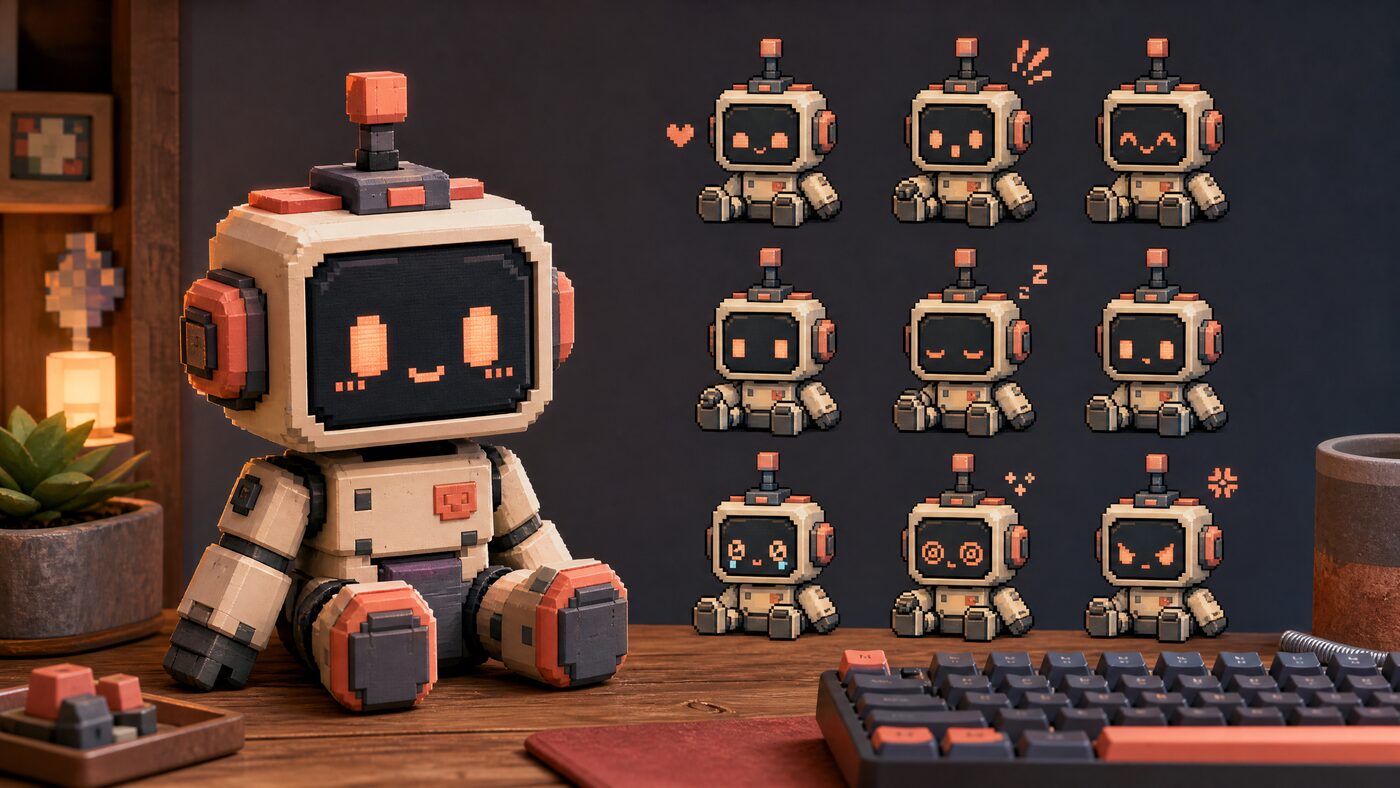
A pet is a tiny state system. The difference between charming and broken is whether the character survives all nine poses.
Quick answer
A Codex pet skin is a set of named visual states packed into a sprite atlas, plus metadata that tells the app how to display them. Start with a character contract, generate in small batches, reject any state that changes species or markings, and validate the atlas and pet.json before installing.
What a Codex pet actually is
A Codex pet is a decorative companion that changes appearance across task states. It does not change how Codex reads, writes or executes work. The visual system is the product: idle, listening, thinking, working, success, error, sleeping, celebrating and alert are nine different jobs, not nine copies of the same picture.
The upstream format expects an atlas, a compact image containing all the frames, plus metadata that names the states and describes the layout. The exact dimensions and state names depend on the current upstream contract. That is why validation matters: a generic sprite sheet can look perfect and still fail the package.
Write the character contract first
Before you generate anything, write down what must never change: species, fur or surface color, distinctive markings, eye color, body proportions and one signature accessory. This is the contract you will use to reject bad generations. Without it, you will keep the charming image that quietly changes the character.
A good contract is short enough to paste into a prompt and specific enough to be checked by eye. For example: a short-haired orange cat with a white chin, one notch on the left ear and a teal collar. Every state must preserve all four details. If a pose hides the ear, choose a different pose.
Prepare the source photo
Use a clear, well-lit photo you own. Crop to the character, not the room. If the face is obscured, the source is wrong; choose another photo before spending a generation. For an original character, use a clean reference sheet instead of a photo.
Do not upload a photo of someone else's pet, a recognizable character or a stock image you have not licensed. A pet is still a derivative work. The fact that it is small and cute does not change the rights.
Generate the nine states in small batches
Generate two or three states at a time, review them against the contract, then continue. A single nine-panel sheet is efficient but hard to correct: one bad frame can contaminate the whole set. Small batches cost more clicks and save more time.
Reject any state that changes the species, markings, eye color or proportions, even if it is more expressive. Consistency beats individual charm. The pet is judged as a system; one inconsistent frame makes the whole companion feel unreliable.
A quick consistency test: shrink all nine frames to 64 pixels and place them in a row. If one frame reads as a different animal, the set is not finished. Detail disappears at that size; silhouette and markings are what survive.
Nine-state check
Click a state. The face changes; the character contract must not.
Silhouette and markings read at small size.
Validate the atlas before you install
The atlas is where visual work meets engineering. Check the image dimensions, the frame grid, the state names, the frame counts and the metadata. A state that is present in the image but missing from pet.json will never appear. A state named differently from the upstream contract will fail silently.
CodexSkin's browser validator checks the package structure and previews all nine states. It cannot judge whether the character is charming, but it can catch the boring failures that waste an install. Run it before you share the package.
Install and restore
Installation follows the upstream pet flow, not a generic ZIP import. Read the current instructions for your platform. On macOS the flow is more complete; on Windows, install and restore work but user-image customization is not at the same level.
Practice the restore path before you customize further. A pet you cannot remove is a support problem. Keep the original package and the restore notes together so the next person can recover the stock state.
The QA checklist we use
Run the checklist twice: once on the raw files and once after the install. The second pass is where caching, permissions and path problems show up. A pet that looks right in the studio and wrong in the app is usually an install problem, not an art problem.
- All nine states exist and are named exactly as the upstream contract expects.
- The character keeps species, markings, eye color and proportions in every frame.
- The silhouette reads at small sizes; details do not turn into noise.
- The atlas dimensions and frame grid match pet.json.
- The package contains no scripts, shell commands or executable files.
- The install and restore paths both work on the target platform.
Free studio or paid playbook?
The free studio is enough to prepare a brief, preview states and validate a package. The $4.99 Pet Hatch Playbook adds the nine-state storyboard, the QA checklist and launch captions. It is a shortcut for people who want the production workflow, not a requirement for using the tool.
If you only make one pet for yourself, start free. If you plan to publish, sell or make several pets, the playbook saves more time than it costs. Either way, do not buy a pack that promises executable installers or one-click magic.
FAQ
What are the nine Codex pet states?
A practical set is idle, listening, thinking, working, success, error, sleeping, celebrating and alert. The exact names and frame counts depend on the current upstream contract, so validate the real package rather than assuming.
Can I make a pet from a photo of my cat?
Yes, if you own the photo and have the right to create and share the result. Keep the species, markings and eye color consistent across all nine states.
Does CodexSkin upload my photo?
No. The photo is decoded and previewed in your browser. The brief and package checks run locally; the image bytes are not sent to CodexSkin.
Why do my pet states look inconsistent?
Most often because the character contract is missing or too vague. Write down the species, markings, eye color and one signature detail, then reject any state that changes them.
Can I sell a Codex pet?
Only with rights to every source image and a license that allows redistribution. Do not sell recognizable characters, brands or someone else's pet photo.
Does the pet change Codex behavior?
No. A pet is decorative. It should only change appearance. Any package that claims to change behavior should be reviewed as software, not as a pet.
Sources and further reading
Next step
Try the free studio
Every guide is easier to follow with a real image. Open the studio, load a preset and test the three surfaces.
More guides
Read next

How to Make a Codex Skin From a Photo Without Hiding the Work
A photo can become a skin in ten minutes. Making it readable after an hour takes a few more decisions.
Codex Skin Safety: The Checklist Before You Run Anything
A theme is decoration. The moment it asks for shell access, it is software. Treat it that way.
Best Codex Themes in 2026: Six Picks That Survive Real Work
A theme should be judged after a long task, not after a screenshot. Here are six directions, the criteria behind them and the failures we reject.